Cause and Effect
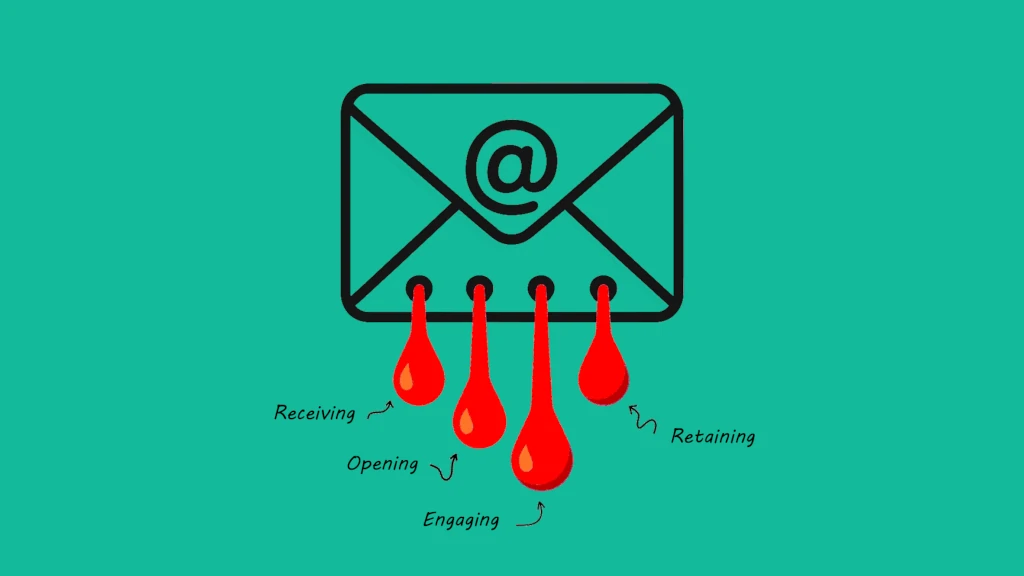
In email marketing, common metrics like open and click rates are merely the effects—they show what happened, but not why.
The real challenge is that most marketers are not equipped with tools to trace these outcomes back to the root causes in their strategy or execution.
In this post, we introduce simple ways to use Klaviyo segmentation based metrics to uncover the weak links in your email marketing and how to fix them for stronger, more consistent performance.
Email: The Overlooked Engine for Revenue Growth
Effectively managing your email list has never been more important.
As paid marketing channels become increasingly expensive and less predictable, email remains one of the few high-impact, owned channels that brands fully control.
But email marketing is not simple. It is a complex, evolving discipline powered by automation, personalization, and data.
The real challenge? Most teams lack a unifying framework to manage their campaigns in a way that protects list health and ensures long-term performance.
Without structure, even the best tools cannot deliver consistent results.
Segment Metrics as Solution
Most marketers use segments primarily to control who receives their email campaigns.
What is often overlooked is how customer lifecycle segmentation metrics can be used for effective email marketing management, helping you identify where you are leaking contacts and make smarter decisions about where to focus your time and resources.
Discover simple ways to calculate key Klaviyo customer lifecycle based segment metrics that will give you deeper insights and help improve the overall effectiveness of your email marketing.
Note: You will also find AI prompts that can be used directly within Klaviyo segment builder, making it easy to recreate each segment on your own.
1. List Utilization
Your email list is like a living, breathing organism. It grows over time and requires regular care to stay healthy.
If neglected, you risk wasting hard-earned contacts and damaging your sender reputation.
The result? Poor deliverability and declining email performance across the board.
Metric: List Utilization Rate (LUR) The percentage of email contacts who received at least one email in the past 30 days, relative to the total number of contacts eligible to receive marketing emails.
LUR = (number of contacts who received email) / (number of contacts eligible to receive email)
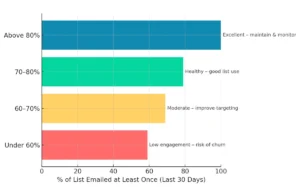
The benchmarks below are designed to help you assess the efficiency of your email strategy and the overall health of your list.
In general, if a significant portion of your list is not receiving at least one email per month, they are far more likely to disengage or worse, churn entirely.
Causes of Low Utilization
Low email list utilization is often caused by a combination of fragmented strategies, poor segmentation, and overreliance on one-off campaigns.
Many brands focus their efforts on short-term promotions or high-intent segments, leaving large portions of their list untouched.
Additionally, fear of hurting open or click rates can lead marketers to under-send, especially to less active contacts.
Without a unified lifecycle framework, it is easy to overlook how many subscribers are being ignored. Over time, this leads to list decay, missed revenue, and weaker overall email performance.
How to Improve Utilization
Segment and Personalize
- Set up lifecycle segments (new, active, non-opens, open-no-click, at-risk)
- Tailor email content and frequency to each lifecycle stage
- Stream personalized shopping experiences into every email sent
Reactivate and Re-engage
- Create re-engagement flows for inactive subscribers
- Run win-back campaigns with exclusive offers or fresh content
- Test subject lines and send times to boost open rates
Audit Campaign Logic
- Review campaign filters and suppressions for over-restriction
- Check that flows are not missing eligible contacts
- Expand targeting beyond just high-intent segments
Automate and Optimize
- Leverage behavioral triggers for automated flows
- Use AI signals to predict engagement or buying intent
- Set up smart sending rules to avoid fatigue
Monitor and Track
- Track the percentage of your list contacted at least once every 30 days
- Set monthly targets for improving utilization
- Report on usage alongside deliverability and engagement metrics
Klaviyo AI Prompts
Klaviyo makes it easy to create dynamic segments using AI prompts. Simply name your segment, then copy and paste the AI prompt below into the “Begin typing or click to select a condition” field.
Segment Name: EP - Can Receive Email AI Prompt: can receive email
Segment Name: EP - Received Email - 30D AI Prompt: can receive email and received email at least once in last 30 days
LUR = (EP - Received Email - 30D) / (EP - Can Receive Email)
2. Non-Open Rate
Your email non-open rate reflects the percentage of subscribers who are not engaging with your emails, often due to poor targeting, frequency issues, or irrelevant content.
While some non-opens are inevitable, monitoring this metric over time helps you identify disengaged segments, adjust your strategy, and improve overall email effectiveness.
Metric: Non-Open Rate (NOR) The percentage of email contacts who received at least one email in the last 30 days but did not open any of them.
NOR = (number of non-open contacts) / (total number of contacts who received emails)
There is no strict industry-standard benchmark for non-opened emails, but general engagement benchmarks below for ecommerce brands can offer helpful guidance:
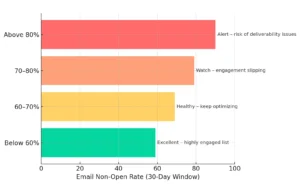
Pro Tip: Do not rely solely on open rates now that Apple Mail Privacy Protection skews the data. Combine click rates, site behavior, and email engagement windows for better insight.
Causes of High Non-Open Rates
High non-open rates are typically caused by poor targeting, irrelevant or generic content, and weak subject lines that fail to capture attention.
Deliverability issues like landing in the spam or promotions folder also play a major role.
Over-emailing or neglecting parts of your list can lead to fatigue or disengagement, especially if messages are not personalized or timed well.
How to Minimize Non-Open Rates
Smarter Segmentation
- Segment based on lifecycle stages (new, active, lapsed)
- Target by behavior (browsing, purchase, inactivity)
- Avoid sending to your full list by default
Stronger Subject Lines
- A/B test subject lines for engagement
- Personalize using name, product interest, or recent actions
- Keep subject lines clear, concise, and compelling
List Hygiene
- Suppress inactive subscribers after 60-90 days
- Remove bounced or invalid email addresses
- Set automated flows to re-engage unresponsive contacts before you sunset them
Send-Time Optimization
- Test different send times and days
- Use your ESP send-time optimization tools
Deliverability Best Practices
- Set up SPF, DKIM, and DMARC records
- Monitor sender reputation
- Avoid spam-triggering words and formats
Add Real Value
- Focus on content your audience actually wants
- Use personalized product recommendations
- Provide exclusive offers or useful insights
Re-Engagement Campaigns
- Set up flows for subscribers who have not opened in 30 or more days
- Offer a reason to return (deal, content, or feedback request)
- Make it easy to opt out or update preferences
Klaviyo AI Prompts
Segment Name: EP - Received Email - 30D AI Prompt: can receive email and received email at least once in the last 30 days
Segment Name: EP - Non-Opens - 30D AI Prompt: can receive email and received email at least once in the last 30 days and opened email zero times in last 30 days
NOR = (EP - Non-Opens - 30D) / (EP - Received Email - 30D)
3. Open-No-Click Rate
The Open-No-Click metric is one of the most misunderstood and most neglected in email marketing.
Many marketers are unaware of the 95-5 rule, which is backed by years of data showing that 95% of potential buyers are not ready to act right now. That is what makes this segment and the use of this metric so strategically important.
Shoppers who open emails but do not click are showing early interest. They are engaged, but not yet ready to buy.
Instead of pushing promotions, this audience needs content that builds brand memory and product awareness so when the time is right, they remember your brand and return to your store with intent to purchase.
Metric: Opened-No Click Rate (ONCR) The percentage of all contacts who received and opened at least one email in the last 30 days but did not click through to visit your online store.
ONCR = (number of contacts that opened and not clicked) / (number of contacts who received email)
We combined open rate and click-through rate benchmarks to help you better interpret your own email performance results:
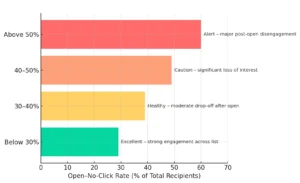
Causes of High Open-No-Click Rates
A common cause of email opens without clicks is a mismatch between interest and intent.
Many recipients open out of curiosity or habit but are not ready to take action. This aligns with the 95-5 rule, which shows that only 5% of potential buyers are ready to purchase at any given time.
Weak calls to action, irrelevant content, or emails that do not deliver on the subject line promise also contribute to the drop-off.
These open-no-click moments often reflect early-stage interest, not disengagement, making them a strategic opportunity to build brand familiarity and future demand.
How to Improve Open to Click Rate
Align with Customer Intent (95-5 Rule)
- Recognize that only about 5% of recipients are ready to buy now. Do not over-focus on hard selling.
- Create content that builds brand memory for the 95% who are not yet ready to convert.
- Stream live, highly personalized products from your online store into every email based on each shopper implied interests and preferences.
Strengthen Content Relevance
- Match email content closely to the subject line promise.
- Personalize emails using lifecycle stage, browsing history, or product interest.
- Segment by behavior to deliver contextually relevant content and CTAs.
Improve Call-to-Action Strategy
- Use clear, action-driven CTA language (e.g., “Shop the Look”, “See What’s New”)
- Make CTAs visually distinct and easy to find.
- Limit to 1-2 primary CTAs per email to reduce distraction.
Test and Optimize
- A/B test different CTA placements, formats, and wording.
- Try varying email formats (text-only, image-heavy, product-focused)
- Track which types of content get the most clicks by segment.
Timing and Frequency
- Send at times your audience is most likely to engage.
- Avoid over-sending to avoid fatigue, especially to the 95% not in a buying mindset.
- Re-engage open-no-click contacts with softer CTAs and informative content.
Klaviyo AI Prompts
Segment Name: EP - Received Email - 30D AI Prompt: can receive email and received email at least once in the last 30 days
Segment Name: EP - Opens - No Click - 30D AI Prompt: can receive email and received email at least once in the last 30 days and opened email at least once in last 30 days and clicked email zero times in last 30 days
ONCR = (EP - Opens - No Click - 30D) / (EP - Received Email - 30D)
4. Contact Retention Rate (CRR)
Email contact retention rate in ecommerce refers to how well you keep subscribers engaged over time, specifically how many continue to open your emails across 30-, 60-, or 90-day periods.
It is a measure of ongoing interest in your brand and attention to your emails.
Keeping this rate high means sending relevant, timely, and personalized content that gives recipients a reason to keep opening.
When retention drops, it is often a leading indicator of email fatigue, lack of value, or weak targeting, all of which can lead to disengagement and eventual list churn.
Metric: Contact Retention Rate (CRR) The percentage of contacts who opened at least one email both in the last 30 days and in the prior 30-day period, relative to the total number of contacts who opened an email in the prior 30-day period.
CRR = (number of shoppers who opened email in two consecutive 30 day time intervals) / (number of shoppers who opened email in prior 30 day time interval)
Email contact retention benchmarks below are based on market averages from Email Pulse customers using a combination of Shopify for ecommerce and Klaviyo for email marketing.
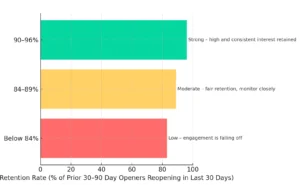
Causes of Low Contact Retention Rates
A drop in contact retention rate is often caused by sending irrelevant or overly frequent emails, leading to subscriber fatigue or disinterest.
Poor segmentation, lack of personalization, and weak value in content can cause recipients to stop opening emails over time.
Additionally, inconsistent sending schedules or failure to adapt messaging to lifecycle stages can accelerate disengagement.
When shoppers do not see ongoing value, they quietly tune out, causing retention rates to decline.
How to Improve Contact Retention
Segment and Personalize
- Use lifecycle segmentation (new, active, lapsed) to tailor messaging
- Personalize emails based on behavior, purchase history, and preferences
- Adjust content relevance as customers move through the buying journey
Optimize Frequency and Cadence
- Maintain a consistent but non-intrusive sending schedule
- Avoid over-emailing, especially to less engaged segments
- Re-engage inactive subscribers with softer content or value-driven messaging
Deliver Value Beyond Promotions
- Balance product offers with educational, inspirational, or brand-building content
- Include personalized product recommendations or discovery experiences
- Use content to create memory and interest even if they are not ready to buy (95-5 rule)
Monitor and Adjust
- Track open and click activity over 30-, 60-, and 90-day windows
- Identify drop-off points and adjust content or segmentation accordingly
- Test subject lines, formats, and content types to sustain interest
Maintain List Health
- Regularly suppress or clean unengaged contacts
- Set up re-engagement flows for dormant subscribers
- Monitor deliverability and engagement metrics to catch issues early
Klaviyo AI Prompts
Segment Name: Retention - 30D - B AI Prompt: can receive email and received email at least once between 31 and 60 days ago and opened email at least once between 31 and 60 days ago
Segment Name: Retention - 30D - R AI Prompt: can receive email and received email at least once between 31 and 60 days ago and opened email at least once between 31 and 60 days ago and opened email at least once in the last 30 days
CRR = (Retention - 30D - R) / (Retention - 30D - B)
Next
It would be fantastic if Klaviyo provided these insights directly within the platform, but the good news is you do not have to wait.
Using simple AI prompts, you can easily create the necessary segments yourself. By periodically tracking the number of contacts in each segment, you can quickly calculate key metrics and uncover performance trends.
This gives you a practical, data-driven framework for managing email performance, helping you prioritize your efforts and continuously optimize results.